Oh yeah, I stopped using this iOS Shortcut because it was a right pain to troubleshoot
Where morning routines go to die
Over the course of years, I built out a morning routine through the iOS Shortcuts app. It helped me manage tasks, track some personal goals, and time block my calendar every day in a way that integrated with the time logging tools at work.
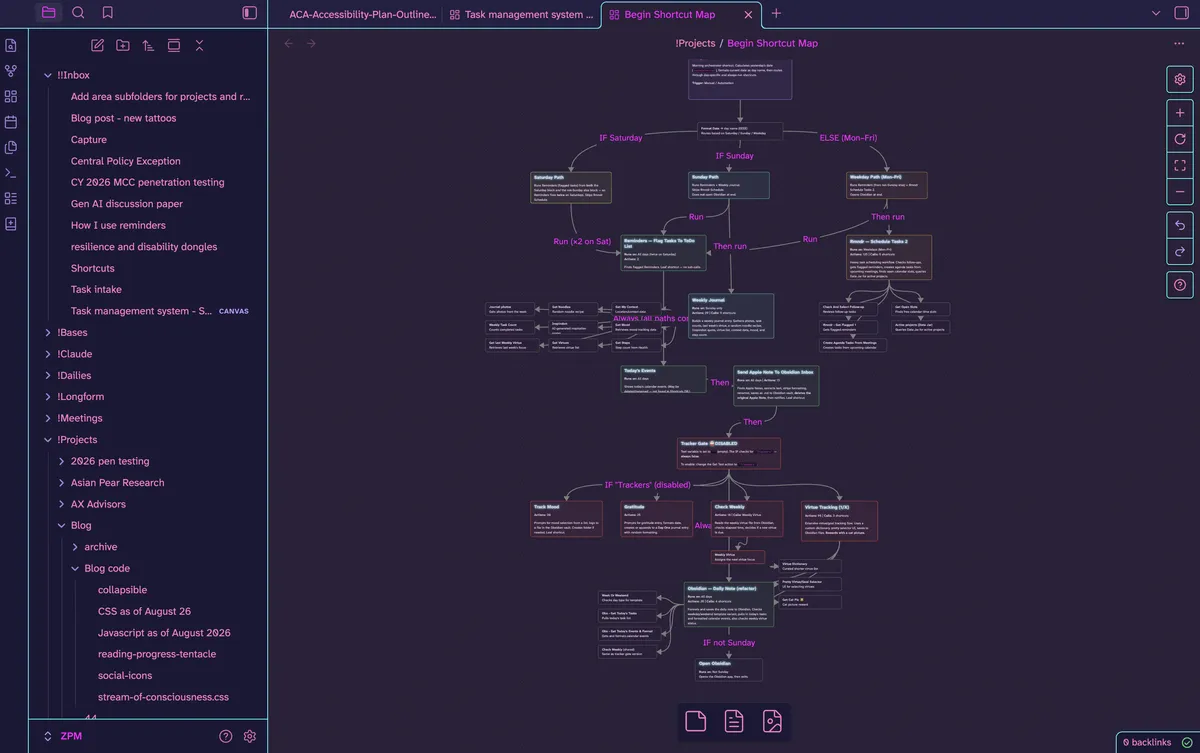
When this thing would break, typically around new iOS releases, it was an absolute pain to troubleshoot. This is when I started coding my own app (see DumbTask link in the nav bar) because I just kept getting so annoyed.
Oh but that time thing
After about a quarter of using the apps which are just... so nice, I realized I had been logging my time at work far less discretely. I could tell my boss where my time had been going specifically because I didn't know.
I'm lucky enough that this isn't an actual problem but he and I just had the division hierarchy reworked so he needs to be better able to find the stuff I'm doing. Which is totally fair and something I, also, want to be able to do.
Time specificity or a better application experience
My options seem to be better time logging or a single-app experience for task management. The former is already encoded in the shortcuts above. And in trial runs today while mapping it out, it seemed like it wasn't erroring out1?
Or I could manually start tagging projects for our custom time tools.... or I guess code some custom export that I can time block with on my work calendar? The former would quite literally take a couple of hours a week to keep up to date and the latter would be a problem unless I figure out a more general time blocking feature that can also result in the time logging stuff for work
Soooo... I think I'm going back to this shortcuts-based monstrosity.
Pray for me.
TBF, I did disable a few things through a IF clause to nowhere.... so maybe I just need yo keep the shortcut simpler.↩